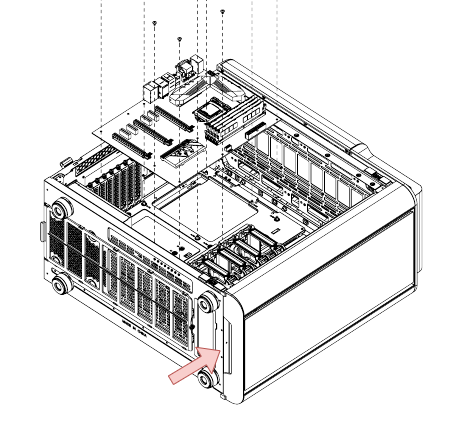
机器上 TT 的散热设备:
- TT Level 20 GT RGB 机箱自带的 2 个 20cm 的 Riing Plus RGB 风扇和 1 个 14cm 的 Riing Plus RGB 风扇,带 1 个 TT 风扇控制盒
- Floe Riing RGB 360 的 RGB 水泵 和冷排上的 3 个 12cm 的 Riing Plus RGB 风扇,带 1 个 TT 风扇控制盒
连接方式:
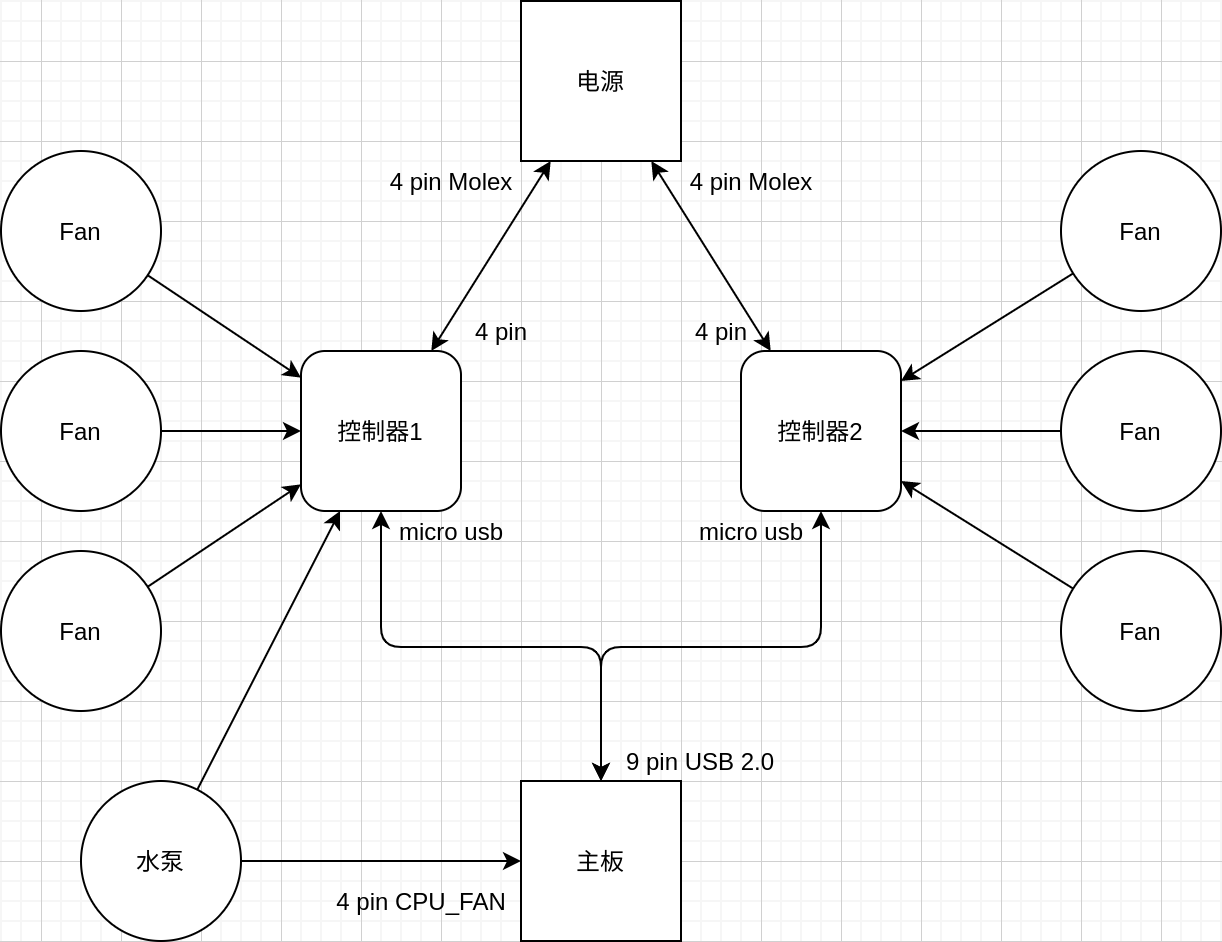
这里要注意的是机箱的 3 个散热风扇都没有接在主板的 CHA_FAN 接口上,这样 BIOS 里针对 CHA_FAN 接口提供的风扇转速调整策略就不能用了。CPU 的散热器还是连接了主板的 CPU_FAN 接口了,从 BIOS 里能看到 CPU 的温度和散热风扇的转速情况。
所有风扇都连接了对应的控制器,这里有 2 个控制器,分别控制机箱的风扇和 CPU 的风扇,控制器通过 1 根 Micro USB 线连接至主板的 USB 2.0 接口上(用来通讯)。官方提供了跑在 Windows 上的 TT RGB Plus 来控制控制器上连接的风扇的转速和灯光,Linux 则可以使用 linux-thermaltake-rgb 这个开源的驱动。
安装 yay
sudo pacman -S --needed git base-devel
git clone https://aur.archlinux.org/yay.git
cd yay
makepkg -si
安装 linux-thermaltake-rgb
yay -S linux-thermaltake-rgb
配置 linux-thermaltake-rgb
以 root 身份打开 /etc/linux_thermaltake_rgb/config.yml,配置内容如下:
controllers:
  - unit: 1
    type: g3
    devices:
      1: Riing Plus
      2: Riing Plus
      3: Riing Plus
      4: Floe Riing RGB
  - unit: 2
    type: g3
    devices:
      1: Riing Plus
      2: Riing Plus
      3: Riing Plus
fan_manager:
  model: curve
  points:
    - [0, 10] # [temp(*C), speed(0-100%)]
    - [60, 10]
    - [70, 30]
    - [100, 100]
  sensor_name: asus_wmi_sensors
lighting_manager:
  model: "off"
-
controllers
这里要指定每个控制盒的编号,以及每个控制盒上连接的设置的型号,控制器编号由在控制盒背面的 DIP 开关来设置,开关状态对应的编号如下图:

如果有多个控制盒,确保每个控制盒的编号不会重复。
然后
devices列表填入每个控制盒(注意区分控制盒编号)上连接的设备型号,这里的序号对应的设备也要和控制盒上接口 ID 连接的设备保持一致。 -
fan_manager
风扇转速控制,有 3 种模式。
-
temp_target
温度正相关。
-
locked_speed
固定速度。
-
curve(推荐)
温度速度相关曲线,相关数值由
points列表指定。
sensor_name可以通过sensors命令查看具体名字,以我的设备为例子,执行sensors命令的输出为:asus_wmi_sensors-virtual-0 Adapter: Virtual device CPU Core Voltage: 828.00 mV CPU SOC Voltage: 1.09 V DRAM AB Voltage: 1.20 V DRAM CD Voltage: 1.20 V 1.8V PLL Voltage: 1.81 V +12V Voltage: 11.77 V +5V Voltage: 5.04 V 3VSB Voltage: 3.33 V VBAT Voltage: 3.07 V AVCC3 Voltage: 3.33 V SB 1.05V Voltage: 1.05 V CPU Core Voltage: 1.39 V CPU SOC Voltage: 1.04 V DRAM AB Voltage: 1.21 V DRAM CD Voltage: 1.20 V CPU Fan: 1748 RPM Chassis Fan 1: 0 RPM Chassis Fan 2: 0 RPM HAMP Fan: 0 RPM Water Pump 1: 0 RPM CPU OPT: 0 RPM Water Flow: 0 RPM Waterblock Flow: 0 RPM EXT Fan 1: 0 RPM EXT Fan 2: 0 RPM EXT Fan 3: 0 RPM Cover Fan: 0 RPM CPU Temperature: +55.0°C CPU Socket Temperature: +54.0°C Motherboard Temperature: +30.0°C Chipset Temperature: +54.0°C Tsensor 1 Temperature: +216.0°C CPU VRM Temperature: +49.0°C Water In: +216.0°C Water Out: +216.0°C Waterblock In: +216.0°C Waterblock Out: +216.0°C EXT Tsensor 1: +0.0°C EXT Tsensor 2: +0.0°C EXT Tsensor 3: +0.0°C Tsensor 2 Temperature: +216.0°C DIMM.2 Tsensor 1 Temperature: +216.0°C DIMM.2 Tsensor 2 Temperature: +216.0°C CPU VRM Output Current: 6.00 A ...则
sensor_name为asus_wmi_sensors(去掉后缀-virtual-0)。 -
启动 linux-thermaltake-rgb
sudo systemctl start linux-thermaltake-rgb.service
sudo systemctl enable linux-thermaltake-rgb.service  # 开机自动启动
可能会遇到的问题
-
缺少 numpy 模块
ModuleNotFoundError: No module named 'numpy'sudo pip install numpy -
缺少 gobject 模块
ERROR: pip's dependency resolver does not currently take into account all the packages that are installed. This behaviour is the source of the following dependency conflicts.
linux-thermaltake-rgb 0.2.0 requires GObject, which is not installed.
sudo pip install gobject -
load() missing 1 required positional argument: ‘Loader’
yaml 最新版本不兼容导致的,改一下源码,兼容最新版本的 yaml。
/usr/lib/python3.10/site-packages/linux_thermaltake_rgb/daemon/config.py
 @@ -58,7 +58,7 @@ def load_config(self):

       cfg = ''.join(cfg_lines)
       LOGGER.debug('raw config file\n** start **\n\n%s\n** end **\n', cfg)
-      return yaml.load(cfg)
+      return yaml.load(cfg, Loader=yaml.FullLoader)

   def parse_config(self, config):
           self.controllers = config.get('controllers')
缺点
关机后,再按电源键开机,从启动到 Linux 系统加载完成这段时间,风扇会变成没有加载驱动的状态,以默认转速运转,RGB 灯光五颜六色,系统启动起来后就恢复成配置的模式工作了。重启机器,重启过程风扇不会恢复成初始状态工作。
]]>